 English
 العربية
 Deutsch
 Español
 Français
 Italiano
 Português
 Русский
 Türkçe
 Tiếng Việt

What Is Website And How It Works
How to Create a Website
Website: Website is a group of web pages which connected to each-others and hosted or managed under a single domain called web server. This is serving as a digital platform which is accessible through internet via a web browser.
It’s like kind of a book with group of pages.
Web Server: Web server is a type of software and a kind part of hardware hat stores website files and delivers them to users on internet upon their request.

Web Browser: web browser is a software application form which is used to access and view available websites on the internet.
DOMAIN AND HOST

Domain: domain is the unique, human-readable name address used to find a website on the internet which automatically converts to computer readable language and find the exact website.
Example: “sellsify.com” is a domain which is human readable Domain replacing computer readable language or any IP address like “192.62.2.1”
There are some anatomies of Domain like:
.com, .org, .net this are the Top-Level Domain which extension at the very end.
Then have the brand name like Brand., or google. Domains, which are Second-Level Domain, a unique brand name or phrase chosen by the owner or the admin.
There also have Subdomain which is an optional prefix used to organize separate sections of a website, Example like: blog.
There are some types of Domains,
1.Generic Top-Level Domain called as gTDLs which are Common extension available for everyone, including .com, .net, .org, and .info.
- Country Code Top-Level Domain called as ccTLDs which are two-letter extensions reserved for specific countries, such as .in (India), or .am (America).
- New Generic Modern Top-Level Domain called as nTLDs Which describes the extensions targeting specific file name extention, like (.zip), (.tech), or (.app).
Host: host is a service provider on web that stores a website's files or data on a physical server so it can be accessed on the internet.

Relation Between Domain And Host:
The Easiest way to understand the relation between Domain and Host the Example is:
If Domain is your home address, then host is your home where your accessories have.
URL: URL is a Uniform Resource Locator that completes web address used to find a specific page, image, or a document on the internet in web server.
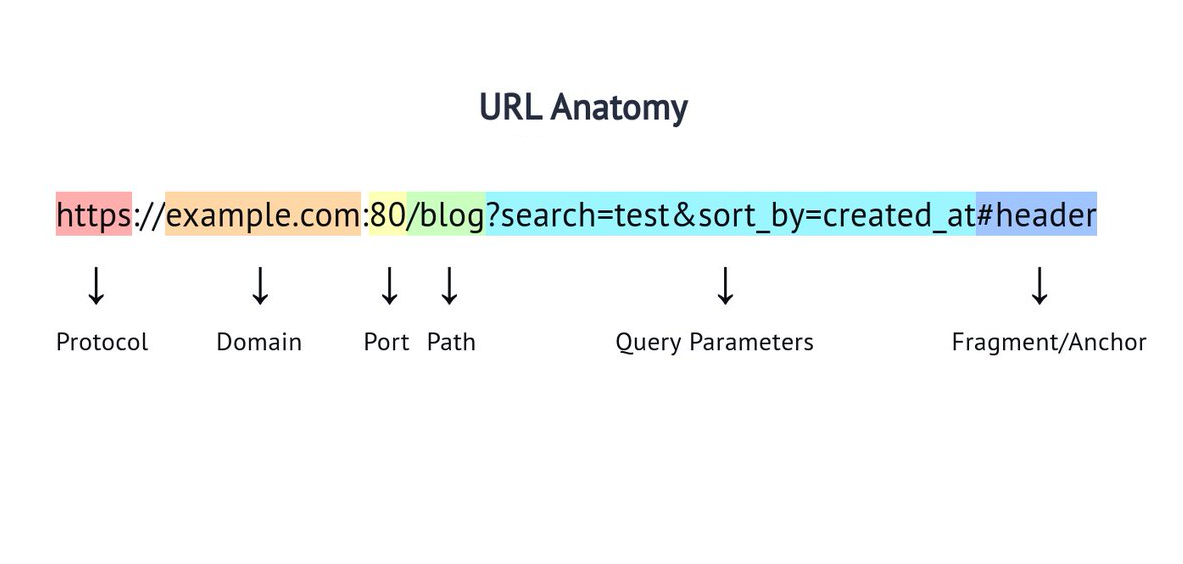
Example, https://www.sellsify.net:112/header.html?search=zipfile#information where “https://” is Protocol or Scheme, “www.” is Sub Domain, “sellsify.” Is Brand name Domain, “.net” is gTDL, “:112” is port, “/header.html” is Path to the file or data, “?search=zipfile” is Query String, “#information” is Fragment or Anchor. That’s how a URL work.
Protocol or Scheme: A protocol or scheme is the first component of a URL that tells web browser Specifying the security rule used to transfer data and exactly how to communicate with a server to access the available data.
HTTP (Hypertext Transfer Protocol) is the early version of Protocol or Scheme where information can readable through out of the server. Suppose you purchase something in web through credit card, your credit card information could readable in server and anyone could misuse your credit card data.
HTTPS (Hypertext Transfer Protocol Secure) is the universal standard and Secure version of HTTP. It’s like end-to-end encryptions all of the data sent between your browser and the server, protecting sensitive information like passwords and credit cards information.
Port: port is a virtual gateway or communication endpoint which is used to organize and route different types of network traffic.
In simple example, if you purchase a train ticket to your destination there will be announcement that your destination train will be arrive at 1 number or 2 number platform.
Path: The exact folder information and file name on the server, showing the browser which exact page to load.
This is like when you rich your destination nearby location and finding for a vehicle and road to the exact location.
Query String: Query String are optional parameters which used to send the data to the server, it commonly seen during the search requests or tracking something information.
This is like got the right vehicle and road to your destination location.
Fragment or Anchor: Fragment or Anchor is an optional marker that marks or tells the browser to automatically load a specific section of that webpage.
This is like reaching your destination location where do you want to descend in front, back, or nearby.
Creation a website: To create a website there are some options like coding or WordPress
With coding you need to well knowledge about some computer language like HTML, CSS, JAVASCRIPT, REACT, SQL etc. for front-end (The structure and function of the website) and the back-end (The security of the website).
With WordPress you need basic knowledge about computer language, there are many plugins to build and handle the website.
Type of websites:
There are some types of websites
- E-Commerce Websites: To sell or purchase digital or physical products through websites.
- Blogs and Content Platforms: individuals or small teams gathered and share information with regularly updated articles, tutorials, or opinion.
- Business or Corporate Websites: To share their identity of a business or corporate to communicate with the clients.
- Portfolio Websites: To share the professional photographers, editors or artists who showcase their artwork, and skills.
- Educational and Informational Platforms: To share the documentary, learning elements, or online courses.
- Social Media and Community Forums: To share individual information’s and communicate peoples through internet.
- Landing Pages: To single marketing campaign with the goal grab users into taking one specific action.

Ark
CEO / Co-Founder
Popular Tools
Recent Posts