 English
 العربية
 Deutsch
 Español
 Français
 Italiano
 Português
 Русский
 Türkçe
 Tiếng Việt

PDF Editing Tools and Daily Needs To Use
PDF Tools and its works.
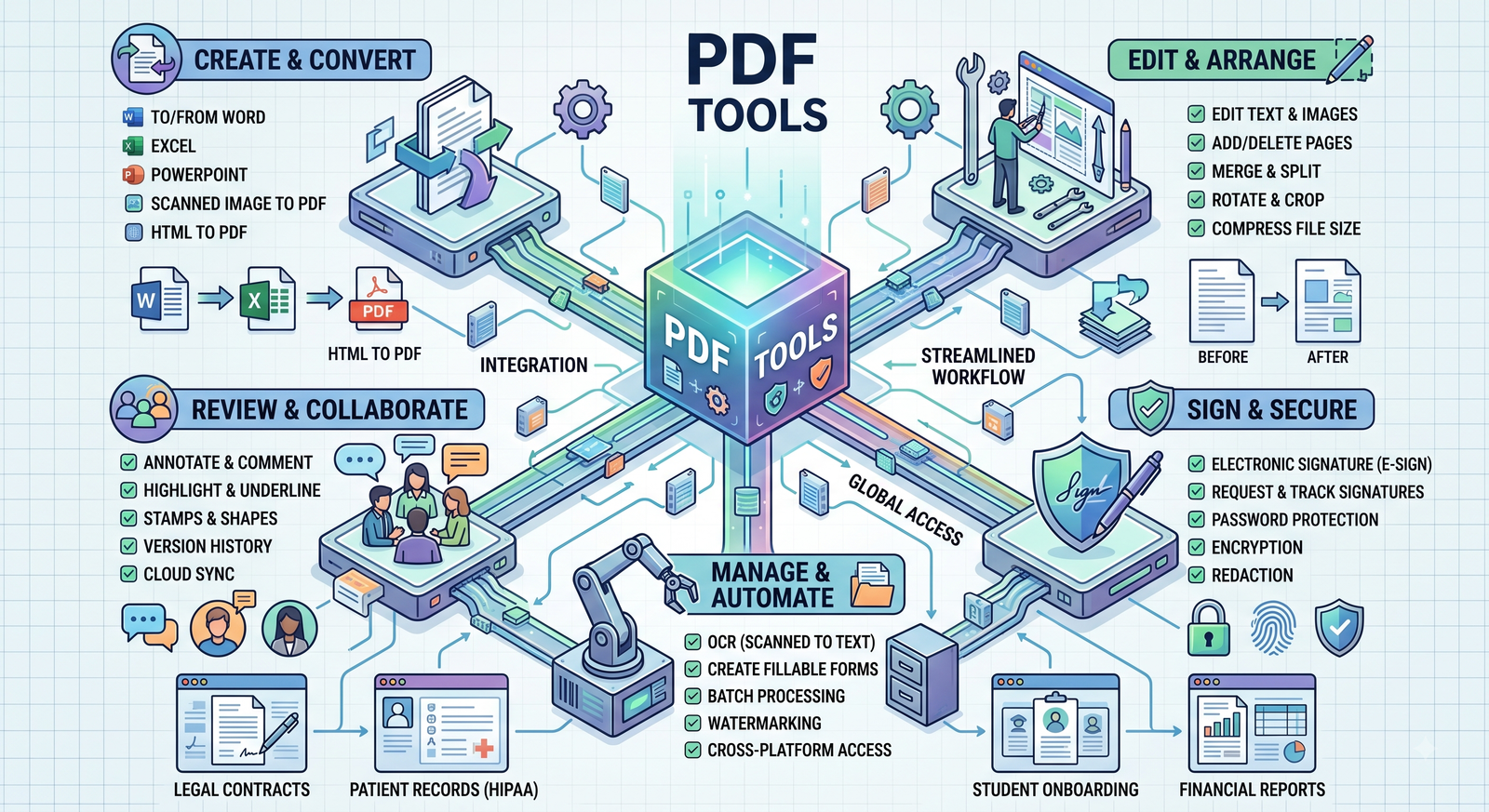
PDF TOOLS: We need pdf documents often in our daily life. PDF tools make easy document work everywhere these days. We use them for school assignments, office documents, invoices, application forms, reports, books, contracts, certificates, and many other things. One of the main reasons PDFs became popular is that they usually look the same on different devices. A document created on one device can be opened on another without completely changing its structure. There is one problem with pdfs. Reading of pdf is easy but create it is much harder. Sometimes we may need to change text, remove a page, combine two files, reduce the file size, or convert the pdf into an editable Word document. Manually is very time taking. This is why we need pdf tools. It provides simple ways to edit, convert, organize, and manage pdf documents without having to start everything from start.
PDF tools are apps or online services that help people perform different works with pdf files. Some tools are designed for a single purpose, while others offer many features in one place. For example, we can find tools for merging pdfs, splitting documents, compressing files, converting pdfs, adding signatures, editing text, and extracting pages. Some advanced apps also include OCR, which can recognize text from scanned documents. There are online, computer and mobile app pdf tools. Online tools good because we can access it through internet and apps better than it because there are more options of tools.
Editing PDF Files: Sometimes we need to edit the pdf for work. A normal pdf reader can only read pdf we could not edit them with it. But with the help of pdf editing tool, we can edit the pdf. For example, we have a pdf which is a business proposal and notice that the address is incorrect. Without a pdf editor, we might have to remake the document or ask the real creator to make the change. With this right tool, we may be able to correct the information directly. Depend upon the software, we can also add text, insert images, highlight important sections, draw shapes, or add comments and notes. This can save a lot of our time, especially when we have to deal with documents that need tiny changes.
Converting PDFs to Other Formats: Another common reason we use pdf tools is file conversion. Sometimes a pdf has information that we need to edit in another app. Instantly, we might receive a pdf with a table and want to work with the data in Excel, a PDF-to-Excel converter can make this process much easier and faster.
Same way, a pdf can be converted into a Word document when we need to make significant changes to the text.
There is one thing to be remember, though. PDF conversion is not always perfect. Some documents have complicated structure, tables, unusual fonts, or lots of images. Sometimes it looks different after conversion. We always have to check the converted file before using or submitting it.
Compressing Large PDF Files: Large pdf files can become frustrating when we need to send them by email or upload them to a website. This is especially common with pdfs which has many high-quality images or scanned pages.
Reducing the Size of a PDF: A pdf file with large size is another problem. A document made from high-resolution scans or lots of photos can become very big in size. We could not send any big size file through emails and even some official website does not support the big size pdf files. PDF compression tools are designed to solve this problem. It reduces the file size. The amount of compression depends on the documents. A simple text document can be compressed without much difference but with full of photographs is another story. Compress it too much and the images can become blurry.
Combining Several PDFs: Sometimes we need many pdf merges together. Maybe that our college application includes a form, an identity document, certificates, and a cover letter. Sending those separate attachments can be frustrating. A pdf merger allows all of them to be put into one file. The same thing happens in the offices. A company may have a report saved separately from its charts, supporting documents, and appendices. Letter they have to merge the file for presentation.
Splitting a PDF: Sometimes we have big data but we need a small part of it. Rather sending the whole file we have to use splitting tool to separate the exact file to send.
Protecting PDF Documents: Sometimes we need to protect the pdf file using password as per some privacy. If we want to send a document a person and only, he can read the document then we have to protect the file with password. Many pdf tools allow users to add passwords to their files. Depending on the software, we may also be able to restrict printing, copying, or editing. However, password protection should not be treated as a fully secure solution. Important files should still be stored carefully, and we should choose trusty software when handling important information.
Adding Digital Signatures: Digital signatures have made an easier to complete paperwork without printing the documents. Sometime we have to fill form online, if there signature need, we could not signature physically. Instead of printing it, signing it with a pen, scanning it, and sending it back, we have to sign it virtually using a pdf signing tool. The signature depends upon the condition of paperwork, if there disclaimed that first we have physically sing then scan and send we have to do the same.

Ark
CEO / Co-Founder
Popular Tools
Recent Posts